Whether you're looking to optimize your Salesforce solution or need custom development,
our team is here to help you unlock the full potential of Salesforce.
When it comes to Salesforce automation solutions, choosing the right tool is important for making your work faster, easier, and more accurate. Salesforce offers multiple automation tools, each designed for different needs.
In this guide, we will help you determine which Salesforce automation tool is best for your business. We will also explain how these tools work, when to use them, and how to ensure your Salesforce setup is robust and future-ready.
By the end of this article, you will have a clear understanding of which automation tool best fits your business processes, whether you are new to Salesforce or looking to improve your existing setup.
What is Salesforce Automation?
Salesforce automation uses technology to complete tasks automatically without requiring human effort each time. It enables businesses to manage repetitive tasks more quickly and consistently.
Using automation helps you:
Save time by minimizing manual work.
Reduce human errors in data entry and processes.
Improve customer experience with faster responses.
Increase team productivity by allowing employees to focus on important tasks.
Standardize your processes so everyone follows the same steps.
Automation in Salesforce is used in many areas, including sales, customer service, marketing, and internal business operations.
Why Choosing the Right Automation Tool Matters
Not every automation tool in Salesforce works the same way. Each tool has its own strengths and limitations. Choosing the right tool ensures that you:
Solve the problem efficiently without unnecessary complexity.
Build processes that are easy to maintain and update.
Ensure your system is scalable as your business grows.
Avoid future issues from unsupported or outdated tools.
Follow Salesforce best practices to future-proof your solutions.
Choosing the wrong tool can cause errors, slow system performance, and result in costly rework. Therefore, it is important to learn about each tool thoroughly before making a decision.
Overview of Salesforce Automation Tools
Salesforce offers several built-in tools to automate tasks and workflows. Here are the main automation tools and guidance on when to use each one.
1. Workflow Rules
Best for: Simple, basic automations.
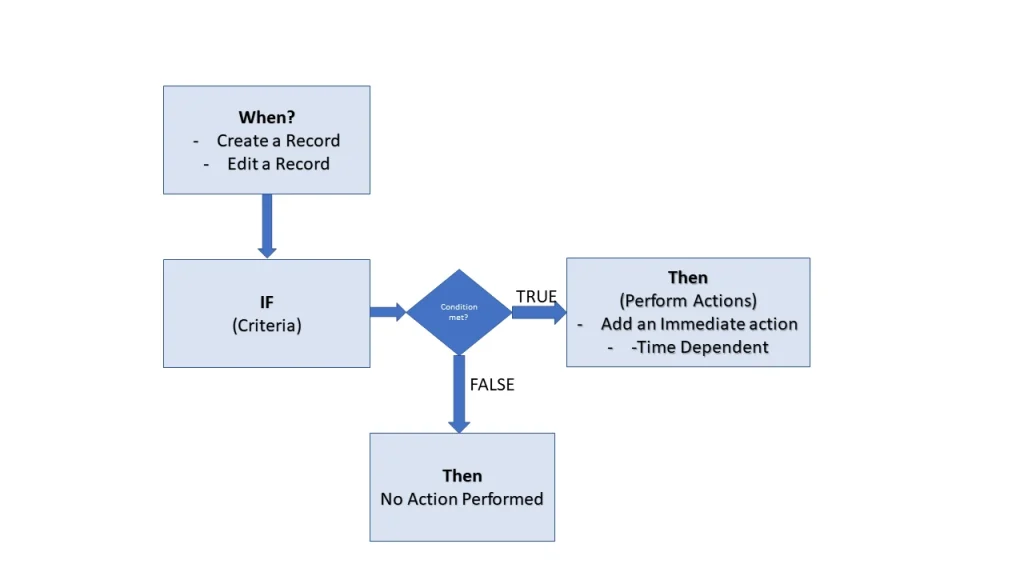
Workflow Rules are used to automate simple tasks based on specific conditions. They have been part of Salesforce workflow automation for a long time and are very easy to set up.
You should use Workflow Rules when you need to:
Send an automatic email when a record is created or updated.
Update fields automatically without user action.
Create tasks for your team based on certain triggers.
Send outbound messages to external systems.
Important Note: Salesforce is gradually phasing out Workflow Rules. New automations should be created using Flow Builder, as Workflow Rules will be retired in the future.
2. Process Builder
Best for: Multi-step and simple conditional processes.
Process Builder allows you to automate multiple actions at once when certain conditions are met. It’s more powerful than Workflow Rules but still easy to use with a point-and-click interface.
You should use Process Builder when you need to:
Update multiple fields across different objects.
Create and manage approval processes.
Launch other processes based on record changes.
Post messages automatically in Chatter.
💡Important Note: Salesforce is also encouraging users to shift from Process Builder to Flow Builder, as Process Builder will eventually be phased out.
3. Flow Builder
Best for: Advanced and flexible automation.
Flow Builder is the most powerful no-code automation tool in Salesforce. It allows you to build complex processes with multiple steps, loops, decisions, and user input forms.
You should use Flow Builder when you need to:
Create screen flows to interact with users.
Build record-triggered flows to automate updates and actions.
Automate complex, multi-step processes with conditional logic.
Connect Salesforce to external systems using APIs.
Handle large volumes of data more efficiently.
Why Flow Builder is important:
Salesforce has made it clear that Flow Builder is the future of automation.
All new features and improvements are focused on Flow, and it will fully replace Workflow Rules and Process Builder in the coming years.
4. Apex Triggers
Best for: Highly complex and custom automations that cannot be built with Flow.
Perform actions before or after a record is inserted, updated, deleted
Work with bulk operations and large amounts of data
Integrate Salesforce with external platforms in a customized way
5. Quick Payable
Best for: Automating accounts payable workflows in Salesforce.
Quick Payable is a Salesforce-native accounts payable automation solution that helps businesses streamline invoice processing, vendor management, approval workflows, and payment tracking directly within Salesforce.
You should use Quick Payable when you need to:
Capture invoice data automatically using AI-powered OCR
Route invoices through automated approval workflows
Manage vendors and payment schedules
Reduce manual data entry and processing errors
Improve visibility into accounts payable operations
Accelerate invoice processing and payment cycles
Benefits of Quick Payable:
Faster invoice processing
Reduced operational costs
Improved financial accuracy
Better audit readiness and compliance
Complete AP visibility inside Salesforce
Quick Payable helps finance teams eliminate repetitive manual tasks, improve efficiency, and gain greater control over accounts payable processes without leaving Salesforce.
6. Quick Receivable
Best for: Automating accounts receivable and collections processes in Salesforce.
Quick Receivable is a Salesforce-native accounts receivable automation solution designed to help businesses manage customer invoices, payment collections, reminders, and cash flow more efficiently.
You should use Quick Receivable when you need to:
Automate invoice generation and delivery
Send payment reminders automatically
Track outstanding invoices and aging balances
Improve collections efficiency
Monitor customer payment activity in real time
Increase cash flow visibility and forecasting accuracy
Benefits of Quick Receivable:
Faster customer payments
Reduced Days Sales Outstanding (DSO)
Improved cash flow management
Automated collections workflows
Better customer payment visibility
Quick Receivable enables finance teams to spend less time chasing payments and more time focusing on strategic financial operations while maintaining complete visibility within Salesforce.
Salesforce Automation Tools vs Business Process Automation Solutions
When discussing automation in Salesforce, it’s important to understand the difference between Salesforce automation tools and business process automation solutions. While both help organizations reduce manual work and improve efficiency, they serve different purposes.
Salesforce Automation Tools
Salesforce provides several built-in automation tools that help businesses automate tasks, workflows, approvals, and data updates directly within the platform. These tools are designed to automate operational processes and user actions.
The most commonly used Salesforce automation tools include:
Workflow Rules – For simple task automation such as email alerts and field updates.
Process Builder – For multi-step automations with conditional logic.
Flow Builder – Salesforce’s primary automation platform for building advanced workflows, approvals, integrations, and user interactions.
Apex Triggers – Custom code-based automation used for highly complex business requirements.
These tools focus on automating actions within Salesforce and improving operational efficiency across sales, service, marketing, and administrative processes.
Salesforce-Native Business Process Automation Solutions
In addition to Salesforce’s built-in automation capabilities, businesses often require specialized solutions to automate finance and accounting operations. This is where Salesforce-native business process automation applications such as Quick Payable and Quick Receivable provide additional value.
Unlike Workflow Rules, Flow Builder, or Apex, these solutions are purpose-built applications that automate entire financial workflows while keeping all data inside Salesforce.
Combining Salesforce Automation with Financial Automation
Many organizations use Flow Builder together with Quick Payable and Quick Receivable to create end-to-end automated business processes.
For example:
A customer order can automatically trigger invoice creation through Quick Receivable.
Payment reminders can be sent automatically based on aging rules.
Incoming vendor invoices can be captured and routed for approval through Quick Payable.
Approved invoices can trigger payment workflows and notifications using Salesforce Flow.
Financial data can be synchronized across departments for real-time visibility and reporting.
This combination allows businesses to automate both operational workflows and financial processes from a single Salesforce environment.
Which Option Is Right for Your Business?
The right solution depends on the process you want to automate:
Business Need
Recommended Solution
Email alerts and field updates
Workflow Rules (Legacy)
Multi-step process automation
Process Builder (Legacy)
Advanced workflows and integrations
Flow Builder
Highly customized business logic
Apex Triggers
Accounts payable automation
Quick Payable
Accounts receivable automation
Quick Receivable
By combining Salesforce automation tools with specialized business process automation solutions, organizations can improve productivity, reduce manual effort, increase financial accuracy, and build a more scalable Salesforce ecosystem.
Conclusion
Choosing the right automation tool in Salesforce is important for building a system that is easy to manage, efficient, and future-ready.
For small, simple tasks, use Workflow Rules.
For slightly more complex processes, use Process Builder.
For powerful, scalable automation, use Flow Builder.
For highly technical custom solutions, use Apex Triggers.
For automating accounts payable and streamlining financial operations, use Quick Payable.
Remember, Salesforce is focusing all future updates on Flow Builder. If you are starting a new automation today, it is best to invest your time in learning and building with Flow.
By selecting the right tool and designing automation properly, you can make your Salesforce system faster, smarter, and more powerful, helping your team work more efficiently and serve customers more quickly.
Shyam Agarwal is an experienced technology professional with over 13 years in the industry. He has successfully delivered a wide range of projects, specializing in Salesforce consulting, development, and administration. Shyam helps businesses implement customized solutions that fit their needs, and he also has expertise in mobile and web application development.










 Shyam Agarwal

 Dadhich Rami